segunda-feira, 26 de maio de 2014
REDES - Interface eth e wlan
Qual é o caminho?
cat /etc/udev/rules.d/70-persistent-net.rules
# This file was automatically generated by the /lib/udev/write_net_rules
# program, run by the persistent-net-generator.rules rules file.
#
# You can modify it, as long as you keep each rule on a single
# line, and change only the value of the NAME= key.
# PCI device 0x10ec:0x8168 (r8169)
SUBSYSTEM=="net", ACTION=="add", DRIVERS=="?*", ATTR{address}=="30:1f:06:62:29:e6", ATTR{dev_id}=="0x0", ATTR{type}=="1", KERNEL=="eth*", NAME="eth0"
# PCI device 0x1814:0x3090 (rt2800pci)
SUBSYSTEM=="net", ACTION=="add", DRIVERS=="?*", ATTR{address}=="81:3f:5e:01:1e:67", ATTR{dev_id}=="0x0", ATTR{type}=="1", KERNEL=="wlan*", NAME="wlan0"
cat /etc/udev/rules.d/70-persistent-net.rules
# This file was automatically generated by the /lib/udev/write_net_rules
# program, run by the persistent-net-generator.rules rules file.
#
# You can modify it, as long as you keep each rule on a single
# line, and change only the value of the NAME= key.
# PCI device 0x10ec:0x8168 (r8169)
SUBSYSTEM=="net", ACTION=="add", DRIVERS=="?*", ATTR{address}=="30:1f:06:62:29:e6", ATTR{dev_id}=="0x0", ATTR{type}=="1", KERNEL=="eth*", NAME="eth0"
# PCI device 0x1814:0x3090 (rt2800pci)
SUBSYSTEM=="net", ACTION=="add", DRIVERS=="?*", ATTR{address}=="81:3f:5e:01:1e:67", ATTR{dev_id}=="0x0", ATTR{type}=="1", KERNEL=="wlan*", NAME="wlan0"
MEMCACHED
Como dar start no memcached:
/usr/local/memcached/bin/memcached -p 11211 -U 11211 -u memcached -m 1024 -c 2048 -P /var/run/memcached/memcached.pid -d
CLUSTER - Servidor SLAVE com o DB corrompido.
Como recuperar a slave com base em outra slave funcional.
##############################################################################
PREPARANDO O DUMP
obs.: conferir se o server slave queComo recuperar a slave com base em outra slave funcional. serbirá de suporte tem a mesma MASTER da slave defeituosa.
# servidor de apoio 192.168.0.3
[root@mcp003~]# cat /usr/local/mysql/data/master.info
14
mcp003-bin.000007
257319864
192.168.0.1
root
<senha do DB>
3306
60
0
# servidor com DB corrompido 192.168.0.2
[root@mcp002~]# cat /usr/local/mysql/data/master.info
10
mcp002-bin.000003
2573123457
192.168.0.1
root
<senha do DB>
3306
60
0
obs.: ambos tem o master como 192.168.0.1
cd ~
cp /usr/local/mysql/data/master.info `date +%Y%m%d.%H%M%S`.master.info .
/usr/local/mysql/bin/mysqldump -uroot -p<senha> --all-databases | pbzip2 -p$(cat /proc/cpuinfo | grep ^processor | wc -l) -c > ~/`date +%Y%m%d.%H%M%S`.dump.`hostname -s`.bz2 &
##############################################################################
CORRIGINDO O DB
#Parando o mysql
/usr/local/mysql/bin/mysqladmin -uroot -pxxxxxxxx shutdown
scp user@192.168.0.3:/home/teste/<data>.* .
cd /usr/local/mysql/
mv data/ `date +%Y%m%d.%H%M%S`.data &
mkdir data
cd data/
cp -r ../<data do bkp>.data/mysql .
cd ~
/usr/local/mysql/bin/mysqld -uroot --skip-slave-start &
pbunzip2 -p$(cat /proc/cpuinfo | grep ^processor | wc -l) -c <data>.dump.mcp003.bz2 | /usr/local/mysql/bin/mysql -uroot -pxxxxxxxx &
cat /home/teste/<data>master.info
14
mcp003-bin.000007
257319864
192.168.0.1
root
<senha do DB>
3306
60
0
/usr/local/mysql/bin/mysqld -uroot -p
show slave status\G;
CHANGE MASTER TO master_host="192.168.0.1",master_log_pos=257319864,master_log_file='mcp003-bin.000007';
start slave;
show slave status\G;
quit;
sexta-feira, 23 de maio de 2014
EMAIL SERVER - teapop
Em um servidor de email, especialmente usado para envio de email marketing, tende a perder alguns serviços devido a sua carga muito alta de processos.
Um exemplo disso é o serviço teapop, ele costuma cair quando a carga é muito alta.
verifica se o serviço está fora:
[root@root~]# ps gauxwww | grep teapop
ou
[root@root~]# history | grep teapop
para dar start:
[root@root~]#/usr/local/libexec/./teapop -s &
verificando se funcionou:
[root@root~]# netstat -a | grep :110
ou
[root@root~]# telnet localhost 110
obs.: esse comando pode ser tornar corriqueiro, então você poupa digitação pesquisando os comandos já dados na máquina, usando seta para cima ou o comando history.
Um exemplo disso é o serviço teapop, ele costuma cair quando a carga é muito alta.
verifica se o serviço está fora:
[root@root~]# ps gauxwww | grep teapop
ou
[root@root~]# history | grep teapop
para dar start:
[root@root~]#/usr/local/libexec/./teapop -s &
verificando se funcionou:
[root@root~]# netstat -a | grep :110
ou
[root@root~]# telnet localhost 110
obs.: esse comando pode ser tornar corriqueiro, então você poupa digitação pesquisando os comandos já dados na máquina, usando seta para cima ou o comando history.
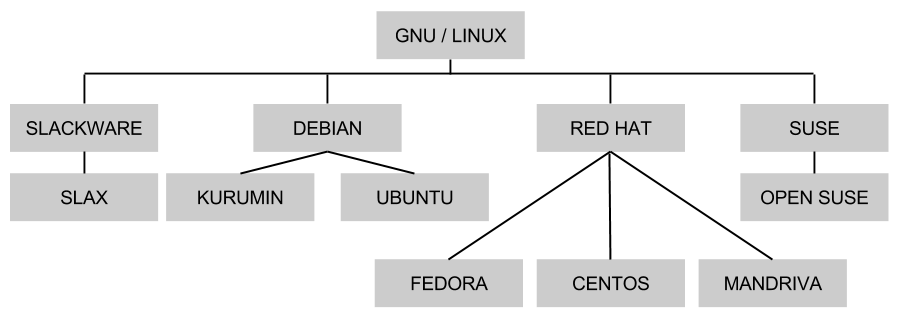
GNU / LINUX - DISTROS (FLAVORS).
Abaixo segue a abaixo algumas distro e sub-distros do linux:
Para uma hierarquia completa acesse:
http://upload.wikimedia.org/wikipedia/commons/1/1b/Linux_Distribution_Timeline.svg
Para uma hierarquia completa acesse:
http://upload.wikimedia.org/wikipedia/commons/1/1b/Linux_Distribution_Timeline.svg
quinta-feira, 22 de maio de 2014
CHAVE RSA - Instalar chave pública no servidor.
Como instalar a chave nos servidores
O RSA envolve um par de chaves, uma chave pública que pode ser conhecida por todos e uma chave privada
que deve ser mantida em sigilo. Toda mensagem cifrada usando uma chave
pública só pode ser decifrada usando a respectiva chave privada. A
criptografia RSA atua diretamente na internet, por exemplo, em mensagens
de emails, em compras on-line e o que você imaginar; tudo isso é
codificado e recodificado pela criptografia RSA.
Vamos aos passos:
1 - logar com ssh usando seu usuário
ssh teste@servidor
2 - Promover teste para root
sudo su -
3 - Checar se o usuario FULANO existe
grep FULANO /etc/passwd
4 - Se não existir criar usuario FULANO
ssh teste@servidor
2 - Promover teste para root
sudo su -
3 - Checar se o usuario FULANO existe
grep FULANO /etc/passwd
4 - Se não existir criar usuario FULANO
adduser FULANO -g [numero do grupo do apache]
5 - Colocar uma senha temporaria
passwd FULANO
6 - Trocar o usuario root para o usuario criado
su - FULANO
7 - Criar a estrutura de chaves do usuario FULANO
ssh localhost
Responder YES, quando for solicitada a senha pressione CTRL + C
8 - Instale a chave
Solicite o par de chaves
scp teste@meuservidor:/home/teste/id_teste.pub ~/.ssh/authorized_keys
9 - Configure as permissões
chmod 600 ~/.ssh/authorized_keys
chown FULANO.[grupo do apache] ~/.ssh/authorized_keys
10 - Volte ao usuario root
exit
11 - Bloqueio a senha de FULANO
passwd -l FULANO
12- Teste de acesso
Abra outra console em sua maquina local
ssh -i ~/.ssh/id_teste FULANO@servidor
se funcionar teste a promocao para root
sudo su -
Se o usuario não tem permissão de root deve pedir a senha ou dar acesso negado.
Tudo funcionando corretamente a instalacao foi feita com sucesso
CHAVE RSA - Como criar.
use o comando:
ssh-keygen -b 2048 -t rsa -f /home/teste/id_teste
irá mostrar:
Generating public/private rsa key pair.
Enter passphrase (empty for no passphrase): (dê enter)
Enter same passphrase again: (dê enter)
Your identification has been saved in /home/teste/id_teste.
Your public key has been saved in /home/teste/id_teste.pub.
The key fingerprint is:
c3:xx:xx:xx:xx:xx:xx:xx:xx:xx:xx:xx:xx:xx:xx:xx (números em hex)
teste@meuservidor.teste.com.br
o resultado será:
[root@root~#] ls -al
-rw------- 1 teste teste 1675 Mai 22 11:12 id_teste
-rw-r--r-- 1 teste teste 419 Mai 22 11:12 id_teste.pub
precisa limpar os dados do seu servidor que ficou na chave pública:
[root@root~]$ cat id_teste.pub
ssh-rsa xxxxxxxxxxxxxxxxxxxxxxxxxxxxxxxxxxxxxxxxxxxxxxxxxxxxxxxxx
xxxxxxxxxxxxxxxxxxxxxxxxxxxxxxxxxxxxxxxxxxxxxxxxxxxxxxxxxxxxxxxx
xxxxxxxxxxxxxxxxxxxxxxxxxxxxxxxxx== teste@meuservidor.teste.com.br
(precisa apagar o teste@meuservidor.teste.com.br)
O arquivo id_teste ficará na máquina que você usará para fazer o acesso, e o arquivo id_teste.pub será instalado no servidor que receberá o acesso.
ssh-keygen -b 2048 -t rsa -f /home/teste/id_teste
irá mostrar:
Generating public/private rsa key pair.
Enter passphrase (empty for no passphrase): (dê enter)
Enter same passphrase again: (dê enter)
Your identification has been saved in /home/teste/id_teste.
Your public key has been saved in /home/teste/id_teste.pub.
The key fingerprint is:
c3:xx:xx:xx:xx:xx:xx:xx:xx:xx:xx:xx:xx:xx:xx:xx (números em hex)
teste@meuservidor.teste.com.br
o resultado será:
[root@root~#] ls -al
-rw------- 1 teste teste 1675 Mai 22 11:12 id_teste
-rw-r--r-- 1 teste teste 419 Mai 22 11:12 id_teste.pub
precisa limpar os dados do seu servidor que ficou na chave pública:
[root@root~]$ cat id_teste.pub
ssh-rsa xxxxxxxxxxxxxxxxxxxxxxxxxxxxxxxxxxxxxxxxxxxxxxxxxxxxxxxxx
xxxxxxxxxxxxxxxxxxxxxxxxxxxxxxxxxxxxxxxxxxxxxxxxxxxxxxxxxxxxxxxx
xxxxxxxxxxxxxxxxxxxxxxxxxxxxxxxxx== teste@meuservidor.teste.com.br
(precisa apagar o teste@meuservidor.teste.com.br)
O arquivo id_teste ficará na máquina que você usará para fazer o acesso, e o arquivo id_teste.pub será instalado no servidor que receberá o acesso.
NAGIOS - Instalação do plugin NRPE
Cenário:
Colocar um novo servidor no monitoramento do NAGIOS.
mkdir -p /usr/local/packages
cd /usr/local/packages
groupadd -g 488 nagios
adduser -c 'NAGIOS user for the NAGIOS and NRPE service' -d / -g 488 -s /sbin/nologin -u 488 nagios
groupadd -g 489 nrpe
adduser -c 'NRPE user for the NRPE service' -d / -g 489 -s /sbin/nologin -u 489 nrpe
wget -c http://prdownloads.sourceforge.net/sourceforge/nagios/nrpe-2.13.tar.gz
wget -c http://prdownloads.sourceforge.net/sourceforge/nagiosplug/nagios-plugins-1.4.15.tar.gz
tar xvzf nrpe-2.13.tar.gz
tar xvfz nagios-plugins-1.4.15.tar.gz
cd nagios-plugins-1.4.15
./configure --with-nagios-user=nrpe --with-nagios-group=nrpe
make all
make install
cd ../nrpe-2.13/
./configure --with-nagios-user=nrpe --with-nagios-group=nrpe --with-ssl-lib=/usr/local/ssl/lib/
make all
make install
chcon -R -t httpd_sys_content_t /usr/local/nagios/
cd
mkdir -p /etc/nagios
mkdir -p /var/run/nrpe
mkdir -p /etc/nrpe.d
vim /etc/nagios/nrpe.cfg
#Coloque o texto abaixo dentro do arquivo nrpe.cfg
#############################################################################
# Sample NRPE Config File
# Written by: Ethan Galstad (nagios@nagios.org)
#
# Last Modified: 11-23-2007
#
# NOTES:
# This is a sample configuration file for the NRPE daemon. It needs to be
# located on the remote host that is running the NRPE daemon, not the host
# from which the check_nrpe client is being executed.
#############################################################################
# LOG FACILITY
# The syslog facility that should be used for logging purposes.
log_facility=daemon
# PID FILE
# The name of the file in which the NRPE daemon should write it's process ID
# number. The file is only written if the NRPE daemon is started by the root
# user and is running in standalone mode.
pid_file=/var/run/nrpe/nrpe.pid
# PORT NUMBER
# Port number we should wait for connections on.
# NOTE: This must be a non-priviledged port (i.e. > 1024).
# NOTE: This option is ignored if NRPE is running under either inetd or xinetd
server_port=5666
# SERVER ADDRESS
# Address that nrpe should bind to in case there are more than one interface
# and you do not want nrpe to bind on all interfaces.
# NOTE: This option is ignored if NRPE is running under either inetd or xinetd
#server_address=127.0.0.1
# NRPE USER
# This determines the effective user that the NRPE daemon should run as.
# You can either supply a username or a UID.
#
# NOTE: This option is ignored if NRPE is running under either inetd or xinetd
nrpe_user=nrpe
# NRPE GROUP
# This determines the effective group that the NRPE daemon should run as.
# You can either supply a group name or a GID.
#
# NOTE: This option is ignored if NRPE is running under either inetd or xinetd
nrpe_group=nrpe
# ALLOWED HOST ADDRESSES
# This is an optional comma-delimited list of IP address or hostnames
# that are allowed to talk to the NRPE daemon.
#
# Note: The daemon only does rudimentary checking of the client's IP
# address. I would highly recommend adding entries in your /etc/hosts.allow
# file to allow only the specified host to connect to the port
# you are running this daemon on.
#
# NOTE: This option is ignored if NRPE is running under either inetd or xinetd
allowed_hosts=127.0.0.1,200.201.207.74
# COMMAND ARGUMENT PROCESSING
# This option determines whether or not the NRPE daemon will allow clients
# to specify arguments to commands that are executed. This option only works
# if the daemon was configured with the --enable-command-args configure script
# option.
#
# *** ENABLING THIS OPTION IS A SECURITY RISK! ***
# Read the SECURITY file for information on some of the security implications
# of enabling this variable.
#
# Values: 0=do not allow arguments, 1=allow command arguments
dont_blame_nrpe=0
# COMMAND PREFIX
# This option allows you to prefix all commands with a user-defined string.
# A space is automatically added between the specified prefix string and the
# command line from the command definition.
#
# *** THIS EXAMPLE MAY POSE A POTENTIAL SECURITY RISK, SO USE WITH CAUTION! ***
# Usage scenario:
# Execute restricted commmands using sudo. For this to work, you need to add
# the nagios user to your /etc/sudoers. An example entry for alllowing
# execution of the plugins from might be:
#
# nagios ALL=(ALL) NOPASSWD: /usr/lib/nagios/plugins/
#
# This lets the nagios user run all commands in that directory (and only them)
# without asking for a password. If you do this, make sure you don't give
# random users write access to that directory or its contents!
# command_prefix=/usr/bin/sudo
# DEBUGGING OPTION
# This option determines whether or not debugging messages are logged to the
# syslog facility.
# Values: 0=debugging off, 1=debugging on
debug=0
# COMMAND TIMEOUT
# This specifies the maximum number of seconds that the NRPE daemon will
# allow plugins to finish executing before killing them off.
command_timeout=60
# CONNECTION TIMEOUT
# This specifies the maximum number of seconds that the NRPE daemon will
# wait for a connection to be established before exiting. This is sometimes
# seen where a network problem stops the SSL being established even though
# all network sessions are connected. This causes the nrpe daemons to
# accumulate, eating system resources. Do not set this too low.
connection_timeout=300
# WEEK RANDOM SEED OPTION
# This directive allows you to use SSL even if your system does not have
# a /dev/random or /dev/urandom (on purpose or because the necessary patches
# were not applied). The random number generator will be seeded from a file
# which is either a file pointed to by the environment valiable $RANDFILE
# or $HOME/.rnd. If neither exists, the pseudo random number generator will
# be initialized and a warning will be issued.
# Values: 0=only seed from /dev/[u]random, 1=also seed from weak randomness
#allow_weak_random_seed=1
# INCLUDE CONFIG FILE
# This directive allows you to include definitions from an external config file.
#include=<somefile.cfg>
# INCLUDE CONFIG DIRECTORY
# This directive allows you to include definitions from config files (with a
# .cfg extension) in one or more directories (with recursion).
include_dir=/etc/nrpe.d/
# COMMAND DEFINITIONS
# Command definitions that this daemon will run. Definitions
# are in the following format:
#
# command[<command_name>]=<command_line>
#
# When the daemon receives a request to return the results of <command_name>
# it will execute the command specified by the <command_line> argument.
#
# Unlike Nagios, the command line cannot contain macros - it must be
# typed exactly as it should be executed.
#
# Note: Any plugins that are used in the command lines must reside
# on the machine that this daemon is running on! The examples below
# assume that you have plugins installed in a /usr/local/nagios/libexec
# directory. Also note that you will have to modify the definitions below
# to match the argument format the plugins expect. Remember, these are
# examples only!
command[check_users]=/usr/local/nagios/libexec/check_users -w 5 -c 10
command[check_load]=/usr/local/nagios/libexec/check_load -w 7,5,3 -c 12,10,8
command[check_xvda1]=/usr/local/nagios/libexec/check_disk -w 20% -c 10% -p /dev/xvda1
command[check_xvda2]=/usr/local/nagios/libexec/check_disk -w 20% -c 10% -p /dev/xvda2
command[check_xvdag]=/usr/local/nagios/libexec/check_disk -w 20% -c 10% -p /dev/xvdag
command[check_xvdah]=/usr/local/nagios/libexec/check_disk -w 20% -c 10% -p /dev/xvdah
command[check_zombie_procs]=/usr/local/nagios/libexec/check_procs -w 5 -c 10 -s Z
command[check_total_procs]=/usr/local/nagios/libexec/check_procs -w 550 -c 600
command[check_http]=/usr/local/nagios/libexec/check_http -w 5 -c 10 -H localhost
command[check_https]=/usr/local/nagios/libexec/check_http -w 5 -c 10 --ssl -H localhost
command[check_ssh]=/usr/local/nagios/libexec/check_ssh -p 22 localhost
# The following examples use hardcoded command arguments...
#command[check_users]=/usr/lib64/nagios/plugins/check_users -w 5 -c 10
#command[check_load]=/usr/lib64/nagios/plugins/check_load -w 15,10,5 -c 30,25,20
#command[check_hda1]=/usr/lib64/nagios/plugins/check_disk -w 20% -c 10% -p /dev/hda1
#command[check_zombie_procs]=/usr/lib64/nagios/plugins/check_procs -w 5 -c 10 -s Z
#command[check_total_procs]=/usr/lib64/nagios/plugins/check_procs -w 150 -c 200
# The following examples allow user-supplied arguments and can
# only be used if the NRPE daemon was compiled with support for
# command arguments *AND* the dont_blame_nrpe directive in this
# config file is set to '1'. This poses a potential security risk, so
# make sure you read the SECURITY file before doing this.
#command[check_users]=/usr/lib64/nagios/plugins/check_users -w $ARG1$ -c $ARG2$
#command[check_load]=/usr/lib64/nagios/plugins/check_load -w $ARG1$ -c $ARG2$
#command[check_disk]=/usr/lib64/nagios/plugins/check_disk -w $ARG1$ -c $ARG2$ -p $ARG3$
#command[check_procs]=/usr/lib64/nagios/plugins/check_procs -w $ARG1$ -c $ARG2$ -s $ARG3$
===============================================
/usr/local/nagios/bin/nrpe -c /etc/nagios/nrpe.cfg -d
ps gauxwww | grep nrpe
/usr/local/nagios/libexec/check_nrpe -H localhost
/usr/local/nagios/libexec/check_nrpe -H localhost -c check_load
vim /etc/init.d/nrpe
#Coloque o texto abaixo dentro do arquivo nrpe
===============================================
#! /bin/sh
#
### BEGIN INIT INFO
# Provides: nrpe
# Required-Start: $local_fs $remote_fs $syslog $named $network $time
# Required-Stop: $local_fs $remote_fs $syslog $named $network
# Should-Start:
# Should-Stop:
# Default-Start: 2 3 4 5
# Default-Stop: 0 1 6
# Short-Description: Start/Stop the Nagios remote plugin execution daemon
### END INIT INFO
PATH=/usr/local/sbin:/usr/local/bin:/sbin:/bin:/usr/sbin:/usr/bin
DAEMON=/usr/local/nagios/bin/nrpe
PROG=nrpe
CONFIG=/etc/nagios/nrpe.cfg
PIDDIR=/var/run/nrpe
test -x $DAEMON || exit 0
# Source function library.
. /etc/init.d/functions
if [ ! -d "$PIDDIR" ]; then
mkdir "$PIDDIR"
chown nrpe "$PIDDIR"
fi
if [ -f "$PIDDIR/$PROG.pid" ]; then
PID=$(cat $PIDDIR/$PROG.pid)
fi
set -e
start() {
# Start daemons.
echo -n $"Starting $PROG: "
$DAEMON -c $CONFIG -d
RETVAL=$?
echo
return $RETVAL
}
stop() {
echo -n $"Shutting down $PROG: "
kill -9 $PID
RETVAL=$?
test -e $PIDDIR/nrpe.pid && rm $PIDDIR/nrpe.pid
echo
return $RETVAL
}
# See how we were called.
case "$1" in
start)
start
;;
stop)
stop
;;
restart|force-reload)
stop
start
;;
*)
echo $"Usage: $0 {start|stop|restart|force-reload}"
exit 2
esac
===============================================
chmod 775 /etc/init.d/nrpe
chkconfig --level 2345 nrpe on
ps gauxwww | grep nrpe
service nrpe stop
ps gauxwww | grep nrpe
service nrpe start
ps gauxwww | grep nrpe
Colocar um novo servidor no monitoramento do NAGIOS.
mkdir -p /usr/local/packages
cd /usr/local/packages
groupadd -g 488 nagios
adduser -c 'NAGIOS user for the NAGIOS and NRPE service' -d / -g 488 -s /sbin/nologin -u 488 nagios
groupadd -g 489 nrpe
adduser -c 'NRPE user for the NRPE service' -d / -g 489 -s /sbin/nologin -u 489 nrpe
wget -c http://prdownloads.sourceforge.net/sourceforge/nagios/nrpe-2.13.tar.gz
wget -c http://prdownloads.sourceforge.net/sourceforge/nagiosplug/nagios-plugins-1.4.15.tar.gz
tar xvzf nrpe-2.13.tar.gz
tar xvfz nagios-plugins-1.4.15.tar.gz
cd nagios-plugins-1.4.15
./configure --with-nagios-user=nrpe --with-nagios-group=nrpe
make all
make install
cd ../nrpe-2.13/
./configure --with-nagios-user=nrpe --with-nagios-group=nrpe --with-ssl-lib=/usr/local/ssl/lib/
make all
make install
chcon -R -t httpd_sys_content_t /usr/local/nagios/
cd
mkdir -p /etc/nagios
mkdir -p /var/run/nrpe
mkdir -p /etc/nrpe.d
vim /etc/nagios/nrpe.cfg
#Coloque o texto abaixo dentro do arquivo nrpe.cfg
#############################################################################
# Sample NRPE Config File
# Written by: Ethan Galstad (nagios@nagios.org)
#
# Last Modified: 11-23-2007
#
# NOTES:
# This is a sample configuration file for the NRPE daemon. It needs to be
# located on the remote host that is running the NRPE daemon, not the host
# from which the check_nrpe client is being executed.
#############################################################################
# LOG FACILITY
# The syslog facility that should be used for logging purposes.
log_facility=daemon
# PID FILE
# The name of the file in which the NRPE daemon should write it's process ID
# number. The file is only written if the NRPE daemon is started by the root
# user and is running in standalone mode.
pid_file=/var/run/nrpe/nrpe.pid
# PORT NUMBER
# Port number we should wait for connections on.
# NOTE: This must be a non-priviledged port (i.e. > 1024).
# NOTE: This option is ignored if NRPE is running under either inetd or xinetd
server_port=5666
# SERVER ADDRESS
# Address that nrpe should bind to in case there are more than one interface
# and you do not want nrpe to bind on all interfaces.
# NOTE: This option is ignored if NRPE is running under either inetd or xinetd
#server_address=127.0.0.1
# NRPE USER
# This determines the effective user that the NRPE daemon should run as.
# You can either supply a username or a UID.
#
# NOTE: This option is ignored if NRPE is running under either inetd or xinetd
nrpe_user=nrpe
# NRPE GROUP
# This determines the effective group that the NRPE daemon should run as.
# You can either supply a group name or a GID.
#
# NOTE: This option is ignored if NRPE is running under either inetd or xinetd
nrpe_group=nrpe
# ALLOWED HOST ADDRESSES
# This is an optional comma-delimited list of IP address or hostnames
# that are allowed to talk to the NRPE daemon.
#
# Note: The daemon only does rudimentary checking of the client's IP
# address. I would highly recommend adding entries in your /etc/hosts.allow
# file to allow only the specified host to connect to the port
# you are running this daemon on.
#
# NOTE: This option is ignored if NRPE is running under either inetd or xinetd
allowed_hosts=127.0.0.1,200.201.207.74
# COMMAND ARGUMENT PROCESSING
# This option determines whether or not the NRPE daemon will allow clients
# to specify arguments to commands that are executed. This option only works
# if the daemon was configured with the --enable-command-args configure script
# option.
#
# *** ENABLING THIS OPTION IS A SECURITY RISK! ***
# Read the SECURITY file for information on some of the security implications
# of enabling this variable.
#
# Values: 0=do not allow arguments, 1=allow command arguments
dont_blame_nrpe=0
# COMMAND PREFIX
# This option allows you to prefix all commands with a user-defined string.
# A space is automatically added between the specified prefix string and the
# command line from the command definition.
#
# *** THIS EXAMPLE MAY POSE A POTENTIAL SECURITY RISK, SO USE WITH CAUTION! ***
# Usage scenario:
# Execute restricted commmands using sudo. For this to work, you need to add
# the nagios user to your /etc/sudoers. An example entry for alllowing
# execution of the plugins from might be:
#
# nagios ALL=(ALL) NOPASSWD: /usr/lib/nagios/plugins/
#
# This lets the nagios user run all commands in that directory (and only them)
# without asking for a password. If you do this, make sure you don't give
# random users write access to that directory or its contents!
# command_prefix=/usr/bin/sudo
# DEBUGGING OPTION
# This option determines whether or not debugging messages are logged to the
# syslog facility.
# Values: 0=debugging off, 1=debugging on
debug=0
# COMMAND TIMEOUT
# This specifies the maximum number of seconds that the NRPE daemon will
# allow plugins to finish executing before killing them off.
command_timeout=60
# CONNECTION TIMEOUT
# This specifies the maximum number of seconds that the NRPE daemon will
# wait for a connection to be established before exiting. This is sometimes
# seen where a network problem stops the SSL being established even though
# all network sessions are connected. This causes the nrpe daemons to
# accumulate, eating system resources. Do not set this too low.
connection_timeout=300
# WEEK RANDOM SEED OPTION
# This directive allows you to use SSL even if your system does not have
# a /dev/random or /dev/urandom (on purpose or because the necessary patches
# were not applied). The random number generator will be seeded from a file
# which is either a file pointed to by the environment valiable $RANDFILE
# or $HOME/.rnd. If neither exists, the pseudo random number generator will
# be initialized and a warning will be issued.
# Values: 0=only seed from /dev/[u]random, 1=also seed from weak randomness
#allow_weak_random_seed=1
# INCLUDE CONFIG FILE
# This directive allows you to include definitions from an external config file.
#include=<somefile.cfg>
# INCLUDE CONFIG DIRECTORY
# This directive allows you to include definitions from config files (with a
# .cfg extension) in one or more directories (with recursion).
include_dir=/etc/nrpe.d/
# COMMAND DEFINITIONS
# Command definitions that this daemon will run. Definitions
# are in the following format:
#
# command[<command_name>]=<command_line>
#
# When the daemon receives a request to return the results of <command_name>
# it will execute the command specified by the <command_line> argument.
#
# Unlike Nagios, the command line cannot contain macros - it must be
# typed exactly as it should be executed.
#
# Note: Any plugins that are used in the command lines must reside
# on the machine that this daemon is running on! The examples below
# assume that you have plugins installed in a /usr/local/nagios/libexec
# directory. Also note that you will have to modify the definitions below
# to match the argument format the plugins expect. Remember, these are
# examples only!
command[check_users]=/usr/local/nagios/libexec/check_users -w 5 -c 10
command[check_load]=/usr/local/nagios/libexec/check_load -w 7,5,3 -c 12,10,8
command[check_xvda1]=/usr/local/nagios/libexec/check_disk -w 20% -c 10% -p /dev/xvda1
command[check_xvda2]=/usr/local/nagios/libexec/check_disk -w 20% -c 10% -p /dev/xvda2
command[check_xvdag]=/usr/local/nagios/libexec/check_disk -w 20% -c 10% -p /dev/xvdag
command[check_xvdah]=/usr/local/nagios/libexec/check_disk -w 20% -c 10% -p /dev/xvdah
command[check_zombie_procs]=/usr/local/nagios/libexec/check_procs -w 5 -c 10 -s Z
command[check_total_procs]=/usr/local/nagios/libexec/check_procs -w 550 -c 600
command[check_http]=/usr/local/nagios/libexec/check_http -w 5 -c 10 -H localhost
command[check_https]=/usr/local/nagios/libexec/check_http -w 5 -c 10 --ssl -H localhost
command[check_ssh]=/usr/local/nagios/libexec/check_ssh -p 22 localhost
# The following examples use hardcoded command arguments...
#command[check_users]=/usr/lib64/nagios/plugins/check_users -w 5 -c 10
#command[check_load]=/usr/lib64/nagios/plugins/check_load -w 15,10,5 -c 30,25,20
#command[check_hda1]=/usr/lib64/nagios/plugins/check_disk -w 20% -c 10% -p /dev/hda1
#command[check_zombie_procs]=/usr/lib64/nagios/plugins/check_procs -w 5 -c 10 -s Z
#command[check_total_procs]=/usr/lib64/nagios/plugins/check_procs -w 150 -c 200
# The following examples allow user-supplied arguments and can
# only be used if the NRPE daemon was compiled with support for
# command arguments *AND* the dont_blame_nrpe directive in this
# config file is set to '1'. This poses a potential security risk, so
# make sure you read the SECURITY file before doing this.
#command[check_users]=/usr/lib64/nagios/plugins/check_users -w $ARG1$ -c $ARG2$
#command[check_load]=/usr/lib64/nagios/plugins/check_load -w $ARG1$ -c $ARG2$
#command[check_disk]=/usr/lib64/nagios/plugins/check_disk -w $ARG1$ -c $ARG2$ -p $ARG3$
#command[check_procs]=/usr/lib64/nagios/plugins/check_procs -w $ARG1$ -c $ARG2$ -s $ARG3$
===============================================
/usr/local/nagios/bin/nrpe -c /etc/nagios/nrpe.cfg -d
ps gauxwww | grep nrpe
/usr/local/nagios/libexec/check_nrpe -H localhost
/usr/local/nagios/libexec/check_nrpe -H localhost -c check_load
vim /etc/init.d/nrpe
#Coloque o texto abaixo dentro do arquivo nrpe
===============================================
#! /bin/sh
#
### BEGIN INIT INFO
# Provides: nrpe
# Required-Start: $local_fs $remote_fs $syslog $named $network $time
# Required-Stop: $local_fs $remote_fs $syslog $named $network
# Should-Start:
# Should-Stop:
# Default-Start: 2 3 4 5
# Default-Stop: 0 1 6
# Short-Description: Start/Stop the Nagios remote plugin execution daemon
### END INIT INFO
PATH=/usr/local/sbin:/usr/local/bin:/sbin:/bin:/usr/sbin:/usr/bin
DAEMON=/usr/local/nagios/bin/nrpe
PROG=nrpe
CONFIG=/etc/nagios/nrpe.cfg
PIDDIR=/var/run/nrpe
test -x $DAEMON || exit 0
# Source function library.
. /etc/init.d/functions
if [ ! -d "$PIDDIR" ]; then
mkdir "$PIDDIR"
chown nrpe "$PIDDIR"
fi
if [ -f "$PIDDIR/$PROG.pid" ]; then
PID=$(cat $PIDDIR/$PROG.pid)
fi
set -e
start() {
# Start daemons.
echo -n $"Starting $PROG: "
$DAEMON -c $CONFIG -d
RETVAL=$?
echo
return $RETVAL
}
stop() {
echo -n $"Shutting down $PROG: "
kill -9 $PID
RETVAL=$?
test -e $PIDDIR/nrpe.pid && rm $PIDDIR/nrpe.pid
echo
return $RETVAL
}
# See how we were called.
case "$1" in
start)
start
;;
stop)
stop
;;
restart|force-reload)
stop
start
;;
*)
echo $"Usage: $0 {start|stop|restart|force-reload}"
exit 2
esac
===============================================
chmod 775 /etc/init.d/nrpe
chkconfig --level 2345 nrpe on
ps gauxwww | grep nrpe
service nrpe stop
ps gauxwww | grep nrpe
service nrpe start
ps gauxwww | grep nrpe
IPTABLES - Bloqueando tentativa de invasão.
Cenário:
[root@192.168.0.1 ~]# lastb -n40
root ssh:notty 116.10.191.201 Thu May 22 09:36 - 09:36 (00:00)
root ssh:notty 116.10.191.201 Thu May 22 09:35 - 09:35 (00:00)
root ssh:notty 116.10.191.167 Thu May 22 06:22 - 06:22 (00:00)
admin ssh:notty 116.10.191.167 Thu May 22 06:22 - 06:22 (00:00)
root ssh:notty 116.10.191.167 Thu May 22 06:22 - 06:22 (00:00)
admin ssh:notty 116.10.191.167 Thu May 22 06:22 - 06:22 (00:00)
root ssh:notty 116.10.191.167 Thu May 22 06:22 - 06:22 (00:00)
admin ssh:notty 116.10.191.167 Thu May 22 06:22 - 06:22 (00:00)
root ssh:notty 116.10.191.167 Thu May 22 06:22 - 06:22 (00:00)
admin ssh:notty 116.10.191.167 Thu May 22 06:22 - 06:22 (00:00)
root ssh:notty 116.10.191.167 Thu May 22 06:22 - 06:22 (00:00)
admin ssh:notty 116.10.191.167 Thu May 22 06:22 - 06:22 (00:00)
root ssh:notty 116.10.191.167 Thu May 22 06:22 - 06:22 (00:00)
admin ssh:notty 116.10.191.167 Thu May 22 06:22 - 06:22 (00:00)
root ssh:notty 116.10.191.167 Thu May 22 06:22 - 06:22 (00:00)
O comando lastb com o parâmetro -n40 trás as últimas 40 tentativas mal-sucedidas de acesso, percebemos que o IP 116.10.191.201 fez várias tentativas de acesso como root e admin no mesmo minuto, ou seja, características de invasão por brute force.
Para resolver isso:
iptables -t filter -A INPUT -s 116.10.191.201 -j DROP
iptables -t filter -A OUTPUT -s 116.10.191.201 -j DROP
iptables -t filter -A FORWARD -s 116.10.191.201 -j DROP
obs.: é importe verificar os usuários default , caso você use alguma aplicação instalada no servidor como mysql, apache, zimbra, etc... , encontre esses usuário e dê o devido tratamento (mudar senha padrão ou bloquear o acesso).
[root@192.168.0.1 ~]# lastb -n40
root ssh:notty 116.10.191.201 Thu May 22 09:36 - 09:36 (00:00)
root ssh:notty 116.10.191.201 Thu May 22 09:35 - 09:35 (00:00)
root ssh:notty 116.10.191.167 Thu May 22 06:22 - 06:22 (00:00)
admin ssh:notty 116.10.191.167 Thu May 22 06:22 - 06:22 (00:00)
root ssh:notty 116.10.191.167 Thu May 22 06:22 - 06:22 (00:00)
admin ssh:notty 116.10.191.167 Thu May 22 06:22 - 06:22 (00:00)
root ssh:notty 116.10.191.167 Thu May 22 06:22 - 06:22 (00:00)
admin ssh:notty 116.10.191.167 Thu May 22 06:22 - 06:22 (00:00)
root ssh:notty 116.10.191.167 Thu May 22 06:22 - 06:22 (00:00)
admin ssh:notty 116.10.191.167 Thu May 22 06:22 - 06:22 (00:00)
root ssh:notty 116.10.191.167 Thu May 22 06:22 - 06:22 (00:00)
admin ssh:notty 116.10.191.167 Thu May 22 06:22 - 06:22 (00:00)
root ssh:notty 116.10.191.167 Thu May 22 06:22 - 06:22 (00:00)
admin ssh:notty 116.10.191.167 Thu May 22 06:22 - 06:22 (00:00)
root ssh:notty 116.10.191.167 Thu May 22 06:22 - 06:22 (00:00)
O comando lastb com o parâmetro -n40 trás as últimas 40 tentativas mal-sucedidas de acesso, percebemos que o IP 116.10.191.201 fez várias tentativas de acesso como root e admin no mesmo minuto, ou seja, características de invasão por brute force.
Para resolver isso:
iptables -t filter -A INPUT -s 116.10.191.201 -j DROP
iptables -t filter -A OUTPUT -s 116.10.191.201 -j DROP
iptables -t filter -A FORWARD -s 116.10.191.201 -j DROP
obs.: é importe verificar os usuários default , caso você use alguma aplicação instalada no servidor como mysql, apache, zimbra, etc... , encontre esses usuário e dê o devido tratamento (mudar senha padrão ou bloquear o acesso).
ZIMBRA - Validando Certificado
Cenário:
Tento logar no webmail e o servidor retorna erro de rede, não concedendo acesso aos emails pessoais.
Primeiro verificamos o servidor:
root@root~# su - zimbra
zimbra@root# zmcontrol start
(isso irá mostrar que alguns serviços estão parados).
Host correio.meudominio.com.br
Starting ldap...Done.
Unable to determine enabled services from ldap.
Enabled services read from cache. Service list may be inaccurate.
Starting logger...Failed.
Starting logswatch...ERROR: service.FAILURE (system failure: ZimbraLdapContext) (cause: javax.net.ssl.SSLHandshakeException sun.security.validator.ValidatorException: PKIX path validation failed: java.security.cert.CertPathValidatorException: timestamp check failed)
zimbra logger service is not enabled! failed.
volte para root com o CTRL + D , então verificaremos a validade do certificado:
/opt/zimbra/bin/zmcertmgr viewdeployedcrt
Que retornará coisas do tipo:
::service mta::
notBefore=Apr 22 23:04:27 2010 GMT
notAfter=Apr 22 23:04:27 2011 GMT
Pra resolver o problema faça o seguinte:
[root@correio ~]# /opt/zimbra/bin/zmcertmgr createca -new
** Creating /opt/zimbra/ssl/zimbra/ca/zmssl.cnf…done
** Creating CA private key /opt/zimbra/ssl/zimbra/ca/ca.key…done.
** Creating CA cert /opt/zimbra/ssl/zimbra/ca/ca.pem…done.
[root@correio ~]# /opt/zimbra/bin/zmcertmgr createcrt -new -days 365
Validation days: 365
** Creating /opt/zimbra/conf/zmssl.cnf…done
** Backup /opt/zimbra/ssl/zimbra to /opt/zimbra/ssl/zimbra.20110423104040
** Generating a server csr for download self -new -keysize 1024
** Creating /opt/zimbra/conf/zmssl.cnf…done
** Backup /opt/zimbra/ssl/zimbra to /opt/zimbra/ssl/zimbra.20110423104040
** Creating server cert request /opt/zimbra/ssl/zimbra/server/server.csr…done.
** Saving server config key zimbraSSLPrivateKey…failed.
** Signing cert request /opt/zimbra/ssl/zimbra/server/server.csr…done.
[root@correio ~]# /opt/zimbra/bin/zmcertmgr deploycrt self
** Saving server config key zimbraSSLCertificate…failed.
** Saving server config key zimbraSSLPrivateKey…failed.
** Installing mta certificate and key…done.
** Installing slapd certificate and key…done.
** Installing proxy certificate and key…done.
** Creating pkcs12 file /opt/zimbra/ssl/zimbra/jetty.pkcs12…done.
** Creating keystore file /opt/zimbra/mailboxd/etc/keystore…done.
** Installing CA to /opt/zimbra/conf/ca…done.
[root@correio ~]# /opt/zimbra/bin/zmcertmgr deployca
** Importing CA /opt/zimbra/ssl/zimbra/ca/ca.pem into CACERTS…done.
** Saving global config key zimbraCertAuthorityCertSelfSigned…failed.
** Saving global config key zimbraCertAuthorityKeySelfSigned…failed.
** Copying CA to /opt/zimbra/conf/ca…done.
[root@correio ~]# /opt/zimbra/bin/zmcertmgr viewdeployedcrt
::service mta::
notBefore=Apr 23 13:40:45 2011 GMT
notAfter=Apr 22 13:40:45 2012 GMT
subject= /C=US/ST=N/A/O=Zimbra Collaboration Suite/OU=Zimbra Collaboration Suite/CN=correio.meudominio.org.br
issuer= /C=US/ST=N/A/L=N/A/O=Zimbra Collaboration Suite/OU=Zimbra Collaboration Suite/CN=correio.meudominio.org.br
SubjectAltName=
::service proxy::
notBefore=Apr 23 13:40:45 2011 GMT
notAfter=Apr 22 13:40:45 2012 GMT
subject= /C=US/ST=N/A/O=Zimbra Collaboration Suite/OU=Zimbra Collaboration Suite/CN=correio.meudominio.org.br
issuer= /C=US/ST=N/A/L=N/A/O=Zimbra Collaboration Suite/OU=Zimbra Collaboration Suite/CN=correio.meudominio.org.br
SubjectAltName=
::service mailboxd::
notBefore=Apr 23 13:40:45 2011 GMT
notAfter=Apr 22 13:40:45 2012 GMT
subject= /C=US/ST=N/A/O=Zimbra Collaboration Suite/OU=Zimbra Collaboration Suite/CN=correio.meudominio.org.br
issuer= /C=US/ST=N/A/L=N/A/O=Zimbra Collaboration Suite/OU=Zimbra Collaboration Suite/CN=correio.meudominio.org.br
SubjectAltName=
::service ldap::
notBefore=Apr 23 13:40:45 2011 GMT
notAfter=Apr 22 13:40:45 2012 GMT
subject= /C=US/ST=N/A/O=Zimbra Collaboration Suite/OU=Zimbra Collaboration Suite/CN=correio.meudominio.org.br
issuer= /C=US/ST=N/A/L=N/A/O=Zimbra Collaboration Suite/OU=Zimbra Collaboration Suite/CN=correio.meudominio.org.br
SubjectAltName=
depois:
root@root~# su -zimbra
zimbra@root# zimbra@root# zmcontrol stop
zimbra@root# zimbra@root# zmcontrol start
Tento logar no webmail e o servidor retorna erro de rede, não concedendo acesso aos emails pessoais.
Primeiro verificamos o servidor:
root@root~# su - zimbra
zimbra@root# zmcontrol start
(isso irá mostrar que alguns serviços estão parados).
Host correio.meudominio.com.br
Starting ldap...Done.
Unable to determine enabled services from ldap.
Enabled services read from cache. Service list may be inaccurate.
Starting logger...Failed.
Starting logswatch...ERROR: service.FAILURE (system failure: ZimbraLdapContext) (cause: javax.net.ssl.SSLHandshakeException sun.security.validator.ValidatorException: PKIX path validation failed: java.security.cert.CertPathValidatorException: timestamp check failed)
zimbra logger service is not enabled! failed.
volte para root com o CTRL + D , então verificaremos a validade do certificado:
/opt/zimbra/bin/zmcertmgr viewdeployedcrt
Que retornará coisas do tipo:
::service mta::
notBefore=Apr 22 23:04:27 2010 GMT
notAfter=Apr 22 23:04:27 2011 GMT
Pra resolver o problema faça o seguinte:
[root@correio ~]# /opt/zimbra/bin/zmcertmgr createca -new
** Creating /opt/zimbra/ssl/zimbra/ca/zmssl.cnf…done
** Creating CA private key /opt/zimbra/ssl/zimbra/ca/ca.key…done.
** Creating CA cert /opt/zimbra/ssl/zimbra/ca/ca.pem…done.
[root@correio ~]# /opt/zimbra/bin/zmcertmgr createcrt -new -days 365
Validation days: 365
** Creating /opt/zimbra/conf/zmssl.cnf…done
** Backup /opt/zimbra/ssl/zimbra to /opt/zimbra/ssl/zimbra.20110423104040
** Generating a server csr for download self -new -keysize 1024
** Creating /opt/zimbra/conf/zmssl.cnf…done
** Backup /opt/zimbra/ssl/zimbra to /opt/zimbra/ssl/zimbra.20110423104040
** Creating server cert request /opt/zimbra/ssl/zimbra/server/server.csr…done.
** Saving server config key zimbraSSLPrivateKey…failed.
** Signing cert request /opt/zimbra/ssl/zimbra/server/server.csr…done.
[root@correio ~]# /opt/zimbra/bin/zmcertmgr deploycrt self
** Saving server config key zimbraSSLCertificate…failed.
** Saving server config key zimbraSSLPrivateKey…failed.
** Installing mta certificate and key…done.
** Installing slapd certificate and key…done.
** Installing proxy certificate and key…done.
** Creating pkcs12 file /opt/zimbra/ssl/zimbra/jetty.pkcs12…done.
** Creating keystore file /opt/zimbra/mailboxd/etc/keystore…done.
** Installing CA to /opt/zimbra/conf/ca…done.
[root@correio ~]# /opt/zimbra/bin/zmcertmgr deployca
** Importing CA /opt/zimbra/ssl/zimbra/ca/ca.pem into CACERTS…done.
** Saving global config key zimbraCertAuthorityCertSelfSigned…failed.
** Saving global config key zimbraCertAuthorityKeySelfSigned…failed.
** Copying CA to /opt/zimbra/conf/ca…done.
[root@correio ~]# /opt/zimbra/bin/zmcertmgr viewdeployedcrt
::service mta::
notBefore=Apr 23 13:40:45 2011 GMT
notAfter=Apr 22 13:40:45 2012 GMT
subject= /C=US/ST=N/A/O=Zimbra Collaboration Suite/OU=Zimbra Collaboration Suite/CN=correio.meudominio.org.br
issuer= /C=US/ST=N/A/L=N/A/O=Zimbra Collaboration Suite/OU=Zimbra Collaboration Suite/CN=correio.meudominio.org.br
SubjectAltName=
::service proxy::
notBefore=Apr 23 13:40:45 2011 GMT
notAfter=Apr 22 13:40:45 2012 GMT
subject= /C=US/ST=N/A/O=Zimbra Collaboration Suite/OU=Zimbra Collaboration Suite/CN=correio.meudominio.org.br
issuer= /C=US/ST=N/A/L=N/A/O=Zimbra Collaboration Suite/OU=Zimbra Collaboration Suite/CN=correio.meudominio.org.br
SubjectAltName=
::service mailboxd::
notBefore=Apr 23 13:40:45 2011 GMT
notAfter=Apr 22 13:40:45 2012 GMT
subject= /C=US/ST=N/A/O=Zimbra Collaboration Suite/OU=Zimbra Collaboration Suite/CN=correio.meudominio.org.br
issuer= /C=US/ST=N/A/L=N/A/O=Zimbra Collaboration Suite/OU=Zimbra Collaboration Suite/CN=correio.meudominio.org.br
SubjectAltName=
::service ldap::
notBefore=Apr 23 13:40:45 2011 GMT
notAfter=Apr 22 13:40:45 2012 GMT
subject= /C=US/ST=N/A/O=Zimbra Collaboration Suite/OU=Zimbra Collaboration Suite/CN=correio.meudominio.org.br
issuer= /C=US/ST=N/A/L=N/A/O=Zimbra Collaboration Suite/OU=Zimbra Collaboration Suite/CN=correio.meudominio.org.br
SubjectAltName=
depois:
root@root~# su -zimbra
zimbra@root# zimbra@root# zmcontrol stop
zimbra@root# zimbra@root# zmcontrol start
quarta-feira, 21 de maio de 2014
AWS Amazon - Servidor com Load
VM na Amazon com load alto, o que fazer?
Atenção: este procedimento só é aconselhado no caso do servidor não querer voltar sozinho.
Modelo de exemplo:
- 1 servidor de aplicação (APACHE)
- 1 servidor de banco (MySQL)
Ferramentas utilizadas:
- 1 servidor NAGIOS (Monitoramento).
Verificamos um alarme em nossa ferramenta :
SERVICE ALERT: Servidor WEB - CRITICAL HARD ; 3 ;CRITICAL - load average: 21.19, 9.51, 4.02
É importante verificar no servidor de aplicação, se tem algo impedindo de executar os processos.
top - 20:09:09 up 14 days, 7:08, 3 users, load average: 21.19, 9.51, 4.02
Tasks: 135 total, 1 running, 134 sleeping, 0 stopped, 0 zombie
Cpu(s): 5.7%us, 2.2%sy, 0.0%ni, 91.4%id, 0.7%wa, 0.0%hi, 0.0%si, 0.0%st
Mem: 15408168k total, 11613132k used, 3795036k free, 484212k buffers
Swap: 0k total, 0k used, 0k free, 7276380k cached
PID USER PR NI VIRT RES SHR S %CPU %MEM TIME+ COMMAND
2309 daemon 20 0 986m 78m 44m S 0.0 0.5 0:24.40 /usr/local/apache/bin/httpd -k start
2451 daemon 20 0 986m 78m 44m S 0.0 0.5 0:26.78 /usr/local/apache/bin/httpd -k start
1681 daemon 20 0 988m 77m 41m S 0.0 0.5 0:41.60 /usr/local/apache/bin/httpd -k start
698 daemon 20 0 987m 76m 41m S 16.9 0.5 1:31.80 /usr/local/apache/bin/httpd -k start
2192 daemon 20 0 991m 76m 37m S 0.0 0.5 0:34.91 /usr/local/apache/bin/httpd -k start
2605 daemon 20 0 987m 74m 39m S 0.0 0.5 5:11.76 /usr/local/apache/bin/httpd -k start
2449 daemon 20 0 985m 73m 42m S 0.0 0.5 0:23.61 /usr/local/apache/bin/httpd -k start
OBS.:
- O PID 698 tem um TIME maior que a maioria dos outros processos, porém, tem consumo de CPU e de memória, podemos concluir que é um processo que esta em execução.
- O PID 2605 tem um TIME maior ainda que todos , porém, não apresenta consumo de CPU e nem de memória, podemos concluir que é um processo candidato a ser o nosso problema.
não havia também um cron rodando no momento do load .
Agora olhamos o servidor de banco de dados, vejamos se alguma query esta parada em sleep por muito tempo ou se existe alguma tabela em lock.
[root@root|~]# /usr/local/mysql/bin/mysql -uroot -p -e'show processlist;'
+----------------+------------+-------------------------------------------+----------+----------------------+------------+------------------------------------------------------+------------------+
| Id | User | Host | db | Command | Time | State | Info |
+----------------+------------+-------------------------------------------+----------+----------------------+------------+-------------------------------------------------------+------------------+
| 14938960 | slave | 192.168.0.1 | NULL | Binlog Dump | 982667 | Master (...) | NULL |
| 17943874 | user | 192.168.0.2 | teste | Sleep | 370 | | NULL |
| 17944307 | user | 192.168.0.2 | teste | Sleep | 1426 | | NULL |
| 17944562 | user | 192.168.0.2 | teste | Sleep | 1396 | | NULL |
| 17953902 | user | 192.168.0.2 | teste | Sleep | 2 | | NULL |
| 17953913 | user | 192.168.0.2 | teste | Sleep | 0 | | NULL |
| 17953914 | root | localhost | NULL | Query | 0 | NULL | show processlist |
+---------------+-------------+-------------------------------------------+-----------+---------------------+------------+-------------------------------------------------------+------------------+
Com esse cenário podemos concluir que os processos mysql (17944562, 17944307 e 17943874) estão congestionando a fila de processos e não estão processando nada (Campo State vazio) .
Resolução:
- acesse o mysql : /usr/local/mysql/bin/mysql -uroot -p
- dê o comando : mysql> show processlist;
- dê kill nos processos parados : kill 17944307;
Você verá que o processo httpd que estava ligado ao processo mysql que foi morto, morrerá também, aliviando assim a carga.
Assinar:
Comentários (Atom)

.png)